What are registers?
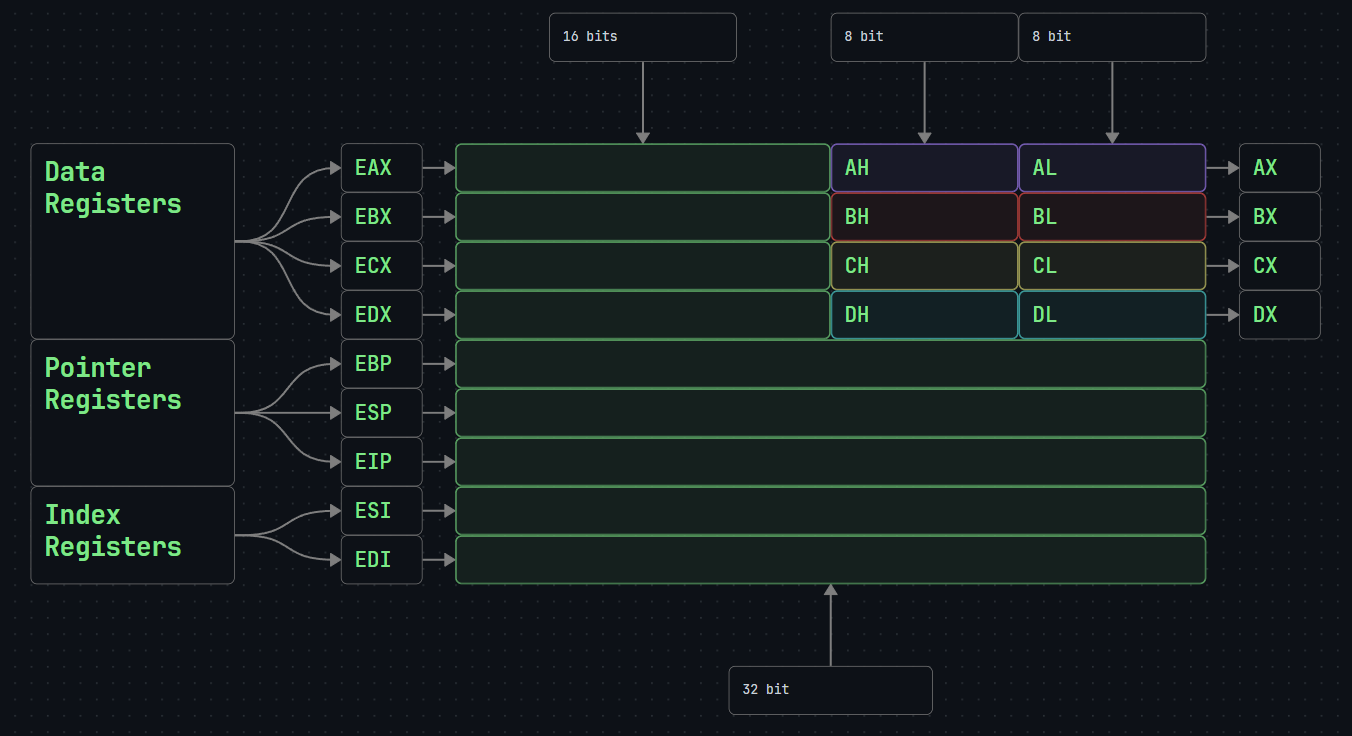
Registers are superfast memory space located in the processor and each processor can have its own proprietary registers. The size of each register in x86 architecture is 32 bits.
General Purpose Registers
These are used to hold data, memory addresses, and intermediate results during program execution. General purpose registers can be divided into three categories which are as follows
- Data Registers: The ones which contain data. These are EAX,EBX,ECX,EDX.
- Pointer Registers: These hold memory addresses. These are EBP, ESP,EIP.
- Index Registers: These are used for index information storage. These are ESI,EDI
The basic x86 general purpose registers mind map is as follows:
Types of General Purpose Registers:
EAX (Accumulator Register):
It stores the results of arithmetic operations and the return values of functions.
EBX (Base Register):
It is the register that holds the base address of the program.
ECX (Counter Register):
It is used in loop and string operations.
EDX (Data Register):
It is a register that is generally used for holding data. It is also used in I/O (Input/Output) operations.
EBP (Base Pointer):
It holds the lowest address of the Stack and is used for local variables.
ESP (Stack Pointer):
It holds the top address of the stack. Displays the last element that entered the Stack.
EIP (Instruction Pointer):
it holds the address of the next instruction to be executed in the program flow
Important
If the value of EIP register is changed, the flow of the program can be interfered with.
ESI (Source Index):
It holds the source index information for string operations. It holds the address of where the data will be read.
EDI (Destination Index):
It holds the destination index information for string operations. It holds the address of where the data will be written.
Segment Registers
Segment registers are the registers used to hold addresses of specific segments in memory.
SS (Stack Segment):
It is the segment that holds the base location address of stack
CS (Code Segment):
It is the register which is known as .text and it holds the address of the code segment used for data access.
DS (Data Segment):
It is the register which is also known as .data and it holds the address of the data segment which is the default variable location for data access.
ES (Extra Segment):
It is the register that holds the address of the extra segment used during string operations.
EFLAGS Registers
The values of the bits of this register allow the CPU operations to be controlled and monitored.
AF (Adjust Flag):
It is the flag that is set when there is a transfer from the 3rd bit to the 4th bit in arithmetic operations.
CF (Carry Flag):
It is the flag that is set in arithmetic operations when the value of the register is more than the maximum value or if the value is less than the minimum value of the register
DF (Direction Flag):
It is the flag that determines the direction in the transport and comparison of string data. The string operation is performed from left to right in case of DF = 0, and from right to left in case ofDF = 1.
IF (Interrupt Flag):
It is the flag that determines if external interruptions are allowed or not. Interruptions are ignored in case of IF = 0and considered disabled, and are applied to the process in case theIF = 1 state.
OF (Overflow Flag):
The overflow flag is set when a positive value for the signed integer is too large to be represented in the register, or when a negative value is too small.
PF (Parity Flag):
It is the flag that shows the total number of 1bits in the results of arithmetic operations. If the total number of “1” bits is even, it becomes “PF = 1”. If the total number of1bits is odd, it becomesPF = 0.
SF (Sign Flag):
It is the flag that indicates whether the result of an arithmetic operation is negative or positive. If the result of the arithmetic operation takes a negative value, the sign flag is set as SF = 1. In case of a positive result, the sign flag will be in the state ofSF = 0.
TF (Trap Flag):
It is the flag that allows the processor to set the operating mode as single-step mode. The debugger program sets this flag to run each command one by one. In this way, each command executed by the processor at the assembly level can be executed step by step.
ZF (Zero Flag):
It is the flag set depending on whether the result of the arithmetic or the comparison operations is 0(zero). If the result of the operation is0, then the zero flag is set asZF = 1. If the operation result is other than zero, then the zero flag is not setZF = 0.